Beginning on March 16, 2026, a 2% payment processing fee will apply when customers pay their utility bill with a credit card, debit card, or digital wallet. This fee is charged by a third-party payment processor
Previously, BPU absorbed card processing fees for the entire payment amount, including Unified Government utility charges that are collected by BPU and passed through on behalf of the Unified Government. This meant the utility was paying processing fees on funds it did not retain, thereby increasing costs ultimately shared across all customers.
Passing the processing fee directly to card users helps ensure fairness across the rate base and supports responsible cost management.
Customers can avoid this fee entirely by using no-fee payment options, such as paying directly from a bank account, enrolling in Autopay with a bank account, or paying by check or money order.
The questions below provide more detail about what’s changing, why this update was made, and the payment options available.
What is changing?
On March 16, 2026, a 2% payment processing fee will apply to utility bill payments made using credit cards, debit cards, or digital wallets.
Is this a new charge added to my utility bill?
No. This is not a new charge on your utility bill. The fee applies only when a customer chooses to pay using a credit card or digital wallet.
Who charges this fee?
The fee is charged by a third-party payment processor, not BPU. BPU does not receive or keep any portion of this fee. Similar processing fees are common with other utilities and government services.
Why are debit cards included in this processing fee?
Debit card payments are processed through the same card networks as credit cards. When a debit card is used online, it is treated as a card transaction by the payment processor and is subject to the same processing fees.
Because BPU’s payment system does not process PIN-based debit transactions, debit card payments are handled as card transactions and are included in the processing fee.
Can I avoid the fee?
Yes. Customers can completely avoid the fee by using no-fee payment options, including:
- Paying directly from a bank account
- Includes scheduling a payment through your bank’s bill pay option
- Enrolling in Autopay using a bank account
- Paying by check or money order
- Paying by check or cash at one of our 30 kiosk locations
See the how-to graphics below these FAQs for making billing changes on MyMeter.
Where can I find my bank account information to make or setup payment?
You can usually find your bank account information in a few common places:
- On a paper check (if you have one):
Along the bottom of the check, you’ll see:
- A 9-digit routing number (identifies your bank)
- Your account number (usually 8–12 digits, depending on your bank)
- In your bank’s mobile app or website:
Look for “Account details” or “Direct deposit information.” Most banks show both the routing number and account number there.
- On a bank statement:
Some statements include this information, or tell you where to find it online.
If you can’t find your routing or account number, contact your bank directly. They can help you locate the correct numbers or walk you through how to make a payment from your account.
What is considered a “digital wallet” payment?
A digital wallet payment is when you pay using a third-party app that stores your card information instead of entering your bank details directly.
At BPU, digital wallet payments include:
- Apple Pay
- Google Pay
- PayPal
- Amazon Pay
Payments made using these apps are subject to the 2% processing fee because they are processed the same way as credit or debit card transactions.
Why is BPU making this change?
Previously, credit card processing costs were absorbed by the utility and spread across all customers, including those who never use card payments. This also included processing fees on Unified Government utility charges that BPU collects and passes through to the Unified Government. Passing the fee directly to card users helps ensure greater fairness across the rate base and supports responsible cost management.
Why doesn’t this result in refunds or lower rates?
Identifying efficiencies like this is one of the ways the utility responsibly manages costs and protects customers. While a single change may not result in an immediate rate reduction, these types of actions help limit upward pressure on rates over time and reduce the need for future rate increases.
Was this change approved?
Yes. This approach was reviewed and approved as part of the 2026 budget process as a responsible financial practice that supports long-term system sustainability.
Why did I first hear about this by text message?
BPU recognizes that the initial text notification announcing this change lacked sufficient context, causing frustration for some customers. That feedback has been heard, and steps are being taken to ensure future communications are clearer and more complete across all channels.
Who can I contact if I have questions or need help paying my bill?
For account-specific questions, payment assistance, or help choosing a no-fee payment option, Customer Care is available at
913-573-9190.
How do I update AutoPay to use my bank account instead of a card?
Customers can avoid the payment processing fee by enrolling in AutoPay using a bank account. You can update your AutoPay method in MyMeter by following these steps:
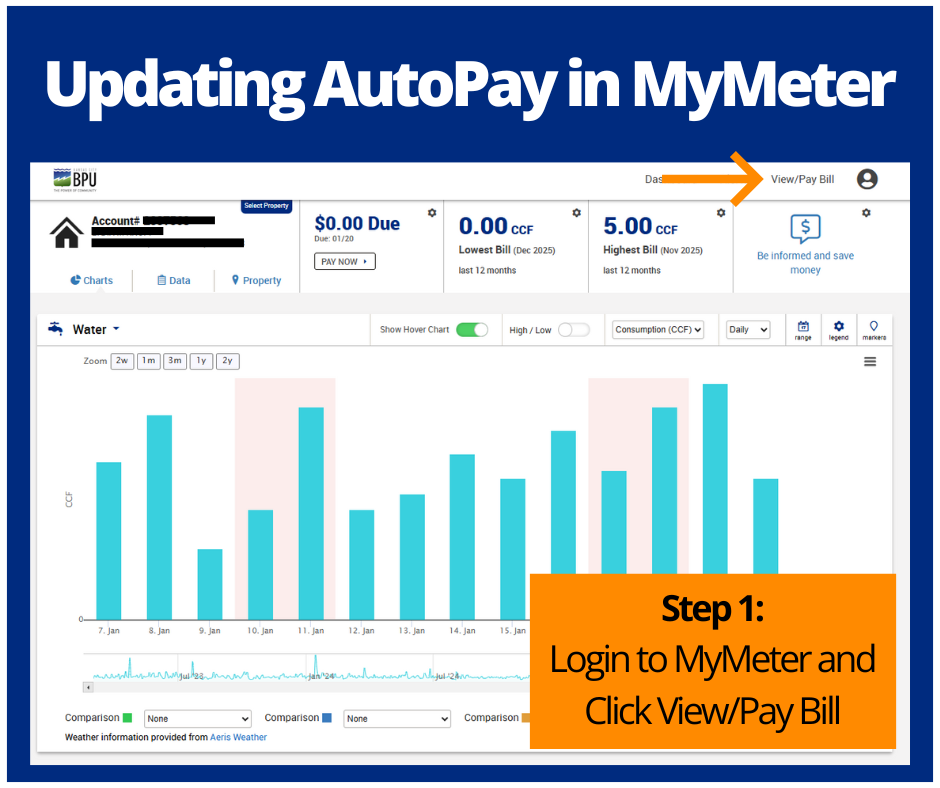
- Log in to MyMeter and click View/Pay Bill in the top-right corner.
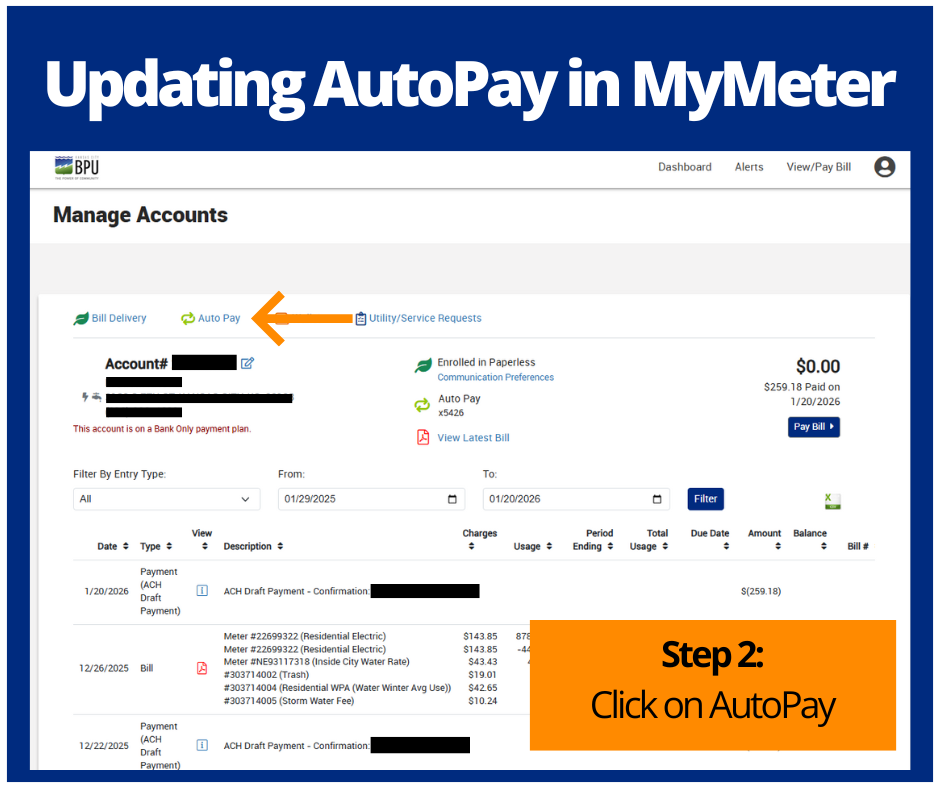
- On the Manage Accounts page, click the Auto Pay tab.
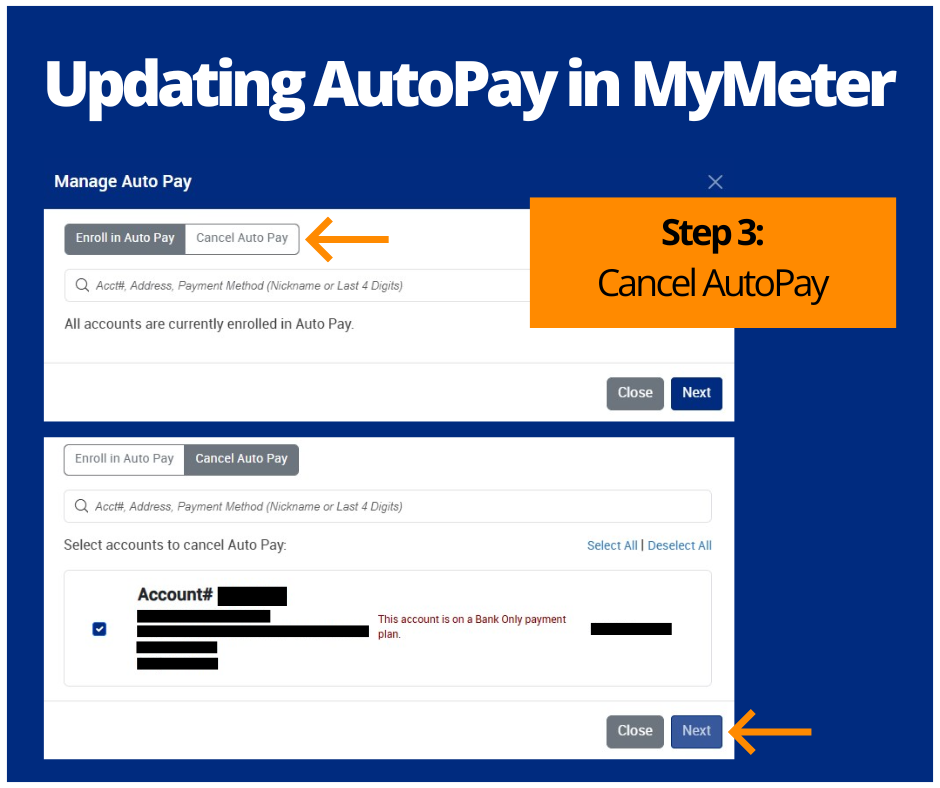
- Select Cancel Auto Pay to remove your current payment method and follow the prompts to confirm.
- After cancellation, click Enroll in Auto Pay, choose Bank Account as your payment method, and enter your banking information to complete enrollment.
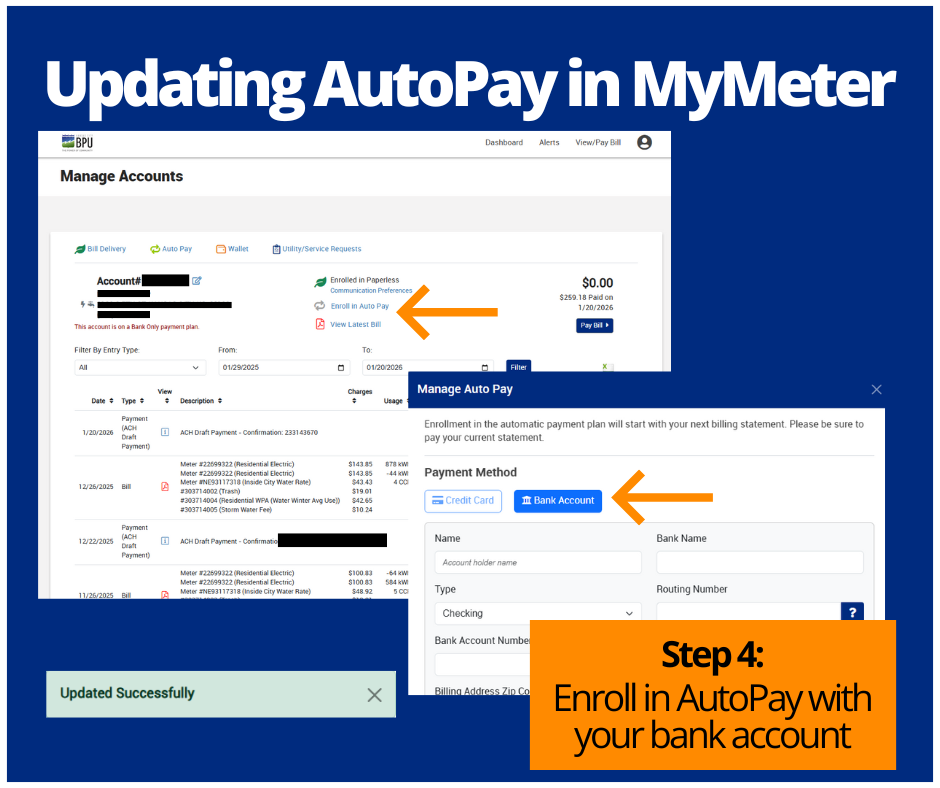
Once submitted, you will receive a confirmation message indicating your AutoPay has been successfully updated.